
Testing PIVKey with the Built In PIV Minidriver
PIVKey can be used with the built in Windows PIV minidriver (read only).
When a PIVKey is inserted in a Windows PC, Windows Plug&Play automatically associates the PIVKey with the built in Windows PIV Minidriver. No PIVKey software is required.
The PIVKey should look as follows in the Device Manager:

The PIVKey Security Chip should be recognized as a Smart Card "Identity Device (NIST SP 800-73 [PIV])".
If you are using a PIVKey Token it will show up as both a reader and a smart card.
To confirm that the PIVKey is working correctly on the User PC, you can run the following command:
certutil -scinfo
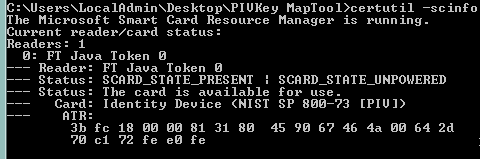
Certutil will bring up the Smart Card PIN dialog for each certificate on the card, and validate that the certificates are available and functional.
Note: The built in PIV Minidriver is "Read Only". You cannot load certificates to the PIVkey with this minidriver.
Testing PIVKey with the Taglio PIVKey Minidriver
When Taglio Minidriver is installed, the device is still seen as a Identity Device in the Device manager.
To check that the correct registry settings are installed, run Certuil -scinfo from the cmd line, and the output should show the name of the associated registry starting with "PIVKey".
Comments
0 comments
Article is closed for comments.